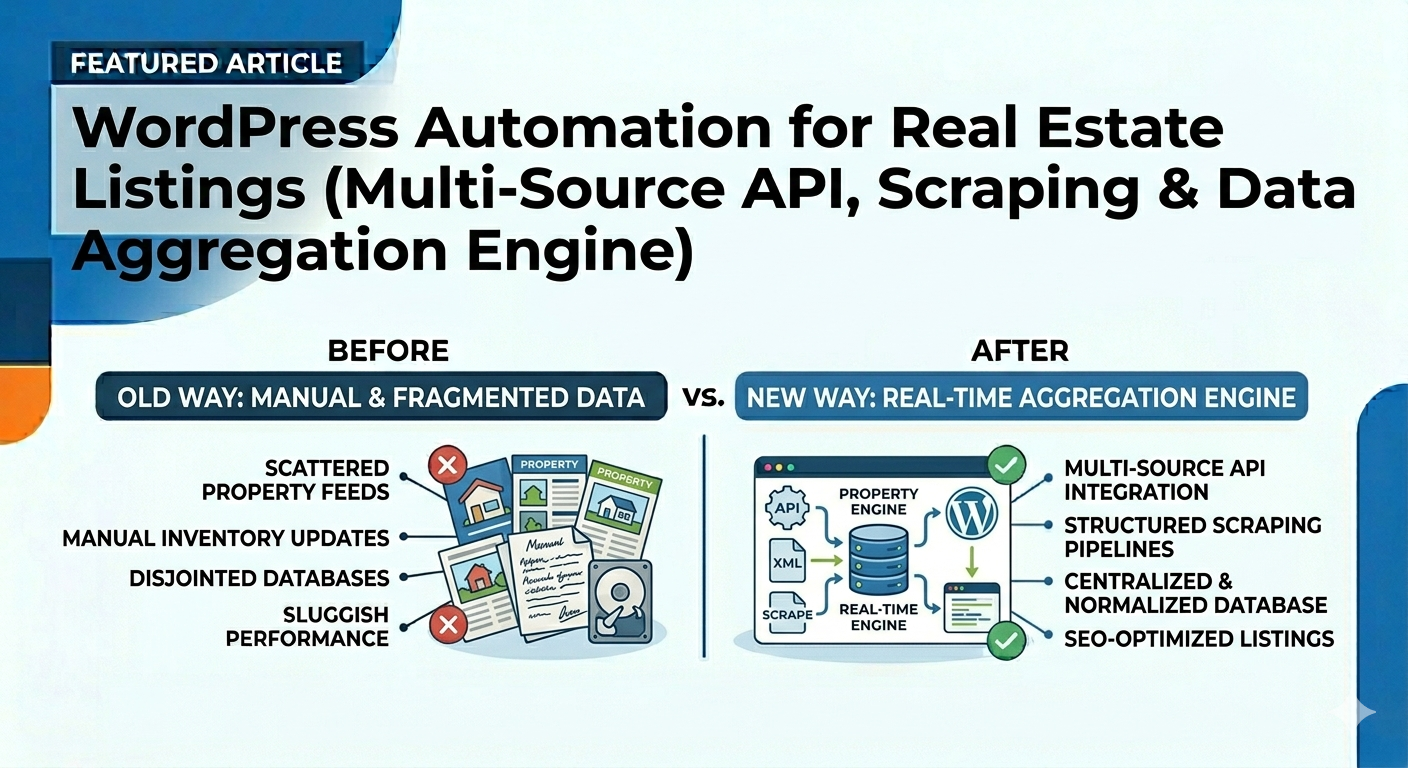

WordPress Automation for Real Estate Listings (Multi-Source API, Scraping & Data Aggregation Engine)
In 2026, real estate platforms are no longer dependent on a single CRM or feed. The most competitive websites are powered by multi-source data aggregation systems—capable of pulling listings from APIs, XML feeds, CRMs, and even structured scraping pipelines.
A WordPress automation system for real estate listings transforms fragmented data into a centralized, normalized, and SEO-optimized property database—automatically updated in real time.
Why Multi-Source Automation Is the Future
Modern agencies and portals operate across multiple systems. Relying on a single data source limits growth.
- Different agents use different CRMs
- Marketplaces provide partial or delayed data
- Manual imports create duplication and errors
- Listings become outdated quickly
A multi-source automation engine ensures your platform becomes a single source of truth for all listings.
All Supported Data Sources (Unlimited Integration)
A scalable system can ingest data from virtually any structured or semi-structured source:
CRM & Property Management Systems
- Pixxi
- Apimo
- Reapit
- Alto (Vebra)
- eGO Real Estate
- Property Finder CRM
- Bayut CRM
- Custom in-house CRMs
Feed Formats & APIs
- REST APIs (JSON)
- XML feeds (Kyero, Rightmove, Zoopla, REAXML, OpenImmo)
- CSV feeds (public or private URLs)
- Google Sheets / Airtable APIs
- GraphQL endpoints
- FTP/SFTP hosted feeds
Web Scraping (Structured Extraction)
- Agency websites
- Marketplace listings
- Broker portals
Scraping is used only where APIs are not available, with structured parsing and compliance considerations.
What Happens After Data Is Collected?
Fetching data is only the first step. The real power comes from data normalization and enrichment.
- Convert different formats into a unified schema
- Standardize fields (price, area, property type)
- Clean duplicates across multiple sources
- Merge listings from different feeds
This creates a clean, structured property database ready for display and search.
AI-Powered Data Enrichment (SEO Advantage)
Raw listings are rarely optimized. AI transforms them into high-performing content:
- Rewrite titles for search intent
- Enhance descriptions for readability
- Generate meta titles and descriptions
- Create image ALT text and captions
- Localize content for different regions
This ensures your listings are SEO-friendly and conversion-optimized.
Real-Time Sync & Smart Processing
Handling thousands of listings requires performance-focused architecture.
- Chunk-based processing to avoid server overload
- Queue systems for background jobs
- Real-time or scheduled synchronization
- Instant updates when data changes
Any change in source data—price, availability, images—reflects automatically on your website.
Automatic Listing Lifecycle Management
A complete automation system manages the entire lifecycle of listings:
- Insert new properties
- Update existing listings
- Remove or archive unavailable properties
- Prevent duplicate entries
This keeps your website clean, accurate, and trusted by users.
WordPress Integration (Theme & Builder Independent)
The system works with all major real estate themes and builders:
- Houzez
- WP Residence
- Homey
- MyHome
- Custom WordPress themes
Also supports:
- Elementor (custom listing templates)
- Shortcodes for dynamic property display
- Headless WordPress setups
Technical Workflow (End-to-End Automation)
- Fetch Data from APIs, feeds, or scraping pipelines
- Normalize Schema into unified structure
- AI Enrichment for SEO optimization
- Chunk Processing for performance
- Insert/Update Listings in WordPress
- Monitor Changes and sync in real time
Sample Code: Multi-Source Property Import (PHP)
function multi_source_property_import() {
$sources = [
'https://api.source1.com/properties',
'https://api.source2.com/listings'
];
foreach ($sources as $url) {
$response = wp_remote_get($url);
if (is_wp_error($response)) continue;
$data = json_decode(wp_remote_retrieve_body($response), true);
foreach ($data as $property) {
$post_id = wp_insert_post([
'post_title' => $property['title'],
'post_type' => 'property',
'post_status' => 'publish'
]);
update_post_meta($post_id, 'price', $property['price']);
update_post_meta($post_id, 'location', $property['location']);
}
}
}
Core Features of the Automation System
- Unlimited data source integration
- API, XML, CSV, and scraping support
- Data normalization and deduplication
- AI-powered SEO enhancement
- Real-time synchronization
- Automatic listing lifecycle management
- High-performance batch processing
Why This Matters for SEO, UX & Growth
- SEO: Fresh, optimized listings rank higher
- User Experience: Accurate data builds trust
- Performance: Optimized processing prevents slowdowns
- Scalability: Supports thousands of listings effortlessly
Why Work With Me?
I build advanced real estate automation systems that aggregate, normalize, and sync data from multiple sources into WordPress.
With 10+ years of experience and 1000+ integrations delivered, I specialize in creating scalable, SEO-driven, and high-performance listing platforms.
Frequently Asked Questions (FAQ)
Q: Can data be imported from multiple sources at once?
Yes. The system supports unlimited APIs, feeds, and scraping pipelines.
Q: Is scraping safe to use?
It is used only where APIs are not available and follows structured, compliant methods.
Q: Can listings update automatically?
Yes. Real-time or scheduled sync ensures all data stays up to date.
Q: Will this work with my theme?
Yes. It supports all major WordPress real estate themes and custom builds.
Ready to Build a Multi-Source Real Estate Platform?
If you want a fully automated system that aggregates and manages property data from multiple sources, this is the architecture you need.
Shopify Data Import via API, CRM, XML & JSON (Real-Time Sync & Automation Guide 2026)
In 2026, successful eCommerce businesses are no longer managing products manually inside Shopify. Instead, they rely on automated data import systems that sync products, inventory, pricing, and orders directly from CRMs, ERPs, APIs, and external feeds.
If you’re dealing with large catalogs, multiple suppliers, or external systems, a Shopify API integration becomes essential to eliminate manual work and ensure real-time accuracy.
What Shopify Data Import Really Means in 2026
Modern Shopify stores are powered by data pipelines, not spreadsheets.
- Import products from CRM, ERP, or supplier APIs
- Sync inventory in real time
- Update pricing and stock automatically
- Push orders back to external systems
- Maintain a single source of truth
This is not just “importing”—this is full system integration.
Supported Data Sources for Shopify Integration
CRM & ERP Systems
- Salesforce
- HubSpot
- Zoho CRM
- Microsoft Dynamics
- Odoo ERP
- SAP
- Oracle NetSuite
- Custom internal systems
Feed Formats & APIs
- REST APIs (JSON)
- GraphQL APIs
- XML feeds
- CSV files (URL-based or uploads)
- Google Sheets API
- FTP / SFTP feeds
- Webhook-based real-time sync
Supplier & Marketplace Data
- Wholesale supplier APIs
- Dropshipping feeds
- Amazon / eBay product sync
- Trade Me listings integration
Common Problems with Basic Shopify Imports
- Manual CSV uploads are slow and error-prone
- No real-time inventory sync (risk of overselling)
- Duplicate or inconsistent product data
- No automation for updates or deletions
- Limited scalability for large catalogs
To scale, you need automation + API-based sync.
Advanced Shopify API Integration (How It Works)
A professional integration system works as a middleware layer between Shopify and your external systems.
- Data Fetching – Pull products from API, XML, or CRM
- Normalization – Map fields (title, price, SKU, inventory)
- Data Enrichment – Optimize titles, descriptions, SEO
- Batch Processing – Import in chunks to avoid timeouts
- Shopify Sync – Create/update products via API
- Two-Way Sync – Send orders back to CRM/ERP
Two-Way Sync: Orders Back to CRM/ERP
Integration is not complete without sending data back.
- Orders created in Shopify → pushed to CRM/ERP
- Inventory updates from ERP → synced to Shopify
- Status updates → reflected across systems
This ensures real-time business operations.
AI-Powered Product Data Enrichment
Raw supplier data is often unoptimized. With AI, you can:
- Rewrite product titles for SEO
- Enhance product descriptions
- Generate meta titles & descriptions
- Improve keyword targeting
- Standardize product attributes
This increases visibility, conversions, and search rankings.
Sample Code: Shopify Product Import via API (PHP)
function shopify_create_product($product) {
$shop = "your-store.myshopify.com";
$access_token = "your-access-token";
$payload = [
"product" => [
"title" => $product['title'],
"body_html" => $product['description'],
"vendor" => $product['brand'],
"variants" => [
[
"price" => $product['price'],
"sku" => $product['sku']
]
]
]
];
$ch = curl_init("https://$shop/admin/api/2024-01/products.json");
curl_setopt($ch, CURLOPT_HTTPHEADER, [
"Content-Type: application/json",
"X-Shopify-Access-Token: $access_token"
]);
curl_setopt($ch, CURLOPT_POST, true);
curl_setopt($ch, CURLOPT_POSTFIELDS, json_encode($payload));
curl_setopt($ch, CURLOPT_RETURNTRANSFER, true);
$response = curl_exec($ch);
curl_close($ch);
return $response;
}
Core Features of Shopify Data Integration
- Real-time product and inventory sync
- Unlimited data sources (API, XML, CSV, CRM)
- Two-way order synchronization
- AI-powered product optimization
- Automated updates and deletions
- Scalable architecture for large catalogs
Why This Matters for eCommerce Growth
- Accuracy: No stock mismatches
- Speed: Instant updates
- SEO: Optimized product content
- Automation: Reduced manual workload
- Scalability: Handle thousands of products
Why Work With Me?
I specialize in Shopify API integrations and data automation systems. With 10+ years of experience and 1000+ integrations delivered, I build scalable solutions that connect your entire business ecosystem.
- API, XML, JSON, CSV integrations
- CRM & ERP synchronization
- Shopify automation workflows
- AI-powered product data optimization
Frequently Asked Questions
Q: Can Shopify import products from API?
Yes, Shopify supports API-based product creation and updates via REST or GraphQL.
Q: Can I sync Shopify with my CRM?
Yes, using custom API integration or middleware.
Q: Does Shopify support real-time inventory sync?
Yes, using webhooks and API updates.
Q: Can I automate product updates?
Yes, using cron jobs or event-driven workflows.
Ready to Automate Your Shopify Store?
Stop managing data manually. Build a fully automated Shopify integration system that scales with your business.
Pinnacle API Integration for Auto Recyclers – Replace iFrame with a High-Converting Omnichannel System
In 2026, auto recyclers and dismantlers using Pinnacle Professional can no longer rely on outdated iFrame-based part search systems. While Pinnacle remains a powerful inventory engine, the way your data is presented and distributed determines whether you gain or lose sales.
A custom Pinnacle API integration transforms your yard into a modern, omnichannel sales machine—delivering real-time inventory to your website, marketplaces, and customers without relying on clunky iFrames.
The Problem: Why Pinnacle iFrame Is Costing You Sales
The traditional Pinnacle/Hollander iFrame setup may “work,” but it introduces serious business limitations:
- Poor mobile experience that drives users away
- No SEO visibility for your parts inventory
- Outdated UI that reduces trust and conversions
- Manual effort required to list parts on marketplaces
- No real-time sync between inventory and sales channels
In today’s competitive environment, this friction directly translates into lost revenue and unsold inventory.
What Does Pinnacle API Integration Actually Mean?
Pinnacle API integration connects your inventory system directly to your website and external platforms using a structured API layer.
This allows your system to:
- Fetch live inventory data from Pinnacle
- Display parts as SEO-friendly product pages
- Sync stock across multiple sales channels
- Automate order updates and inventory changes
Your website becomes a fully functional sales platform instead of just a basic search tool.
Enterprise Features Enabled by API Integration
Custom Search Experience (No iFrame)
Build a modern search UI with filters like Year, Make, Model, and Part Type—optimized for mobile and conversions.
SEO-Optimized Part Pages
Each part becomes a real indexable page, helping you rank for searches like “Toyota Hilux gearbox” or “Ford Ranger engine.”
Two-Way Inventory Sync
When a part is sold on your website, eBay, or TradeMe, inventory updates instantly across all platforms.
Marketplace Automation
Automatically publish listings to platforms like eBay or TradeMe and remove them when sold—eliminating ghost stock.
Real-Time Order Updates
Orders created on your website or marketplaces are pushed back into Pinnacle automatically.
How the Integration Works (Technical Workflow)
- API Connection: Secure connection established with Pinnacle system.
- Data Extraction: Inventory data is fetched and normalized.
- Frontend Rendering: Parts displayed as custom pages inside WordPress.
- Marketplace Sync: Listings pushed to external platforms automatically.
- Order Sync: Sales data posted back to Pinnacle in real time.
Core Features of the System
- Custom WordPress or SaaS-based frontend
- Real-time or scheduled inventory sync
- Multi-channel listing automation
- Two-way order synchronization
- Mobile-first search and UX design
- Scalable architecture for large inventories
Why This Matters for Modern Auto Recyclers
In 2026, success is not just about having inventory—it’s about visibility and accessibility.
If customers cannot easily find and purchase your parts online, they will buy from competitors who offer a better digital experience.
This integration ensures:
- Faster customer journeys
- Higher conversion rates
- Better search engine rankings
- Reduced manual workload
Why Work With Me?
I specialize in custom API integrations for complex inventory systems, including automotive, real estate, and eCommerce platforms. With 10+ years of experience and 1000+ successful integrations, I build systems that are scalable, automated, and designed for real business growth.
Frequently Asked Questions
Q: Can Pinnacle be integrated without using an iFrame?
Yes. A full API-based integration replaces the iFrame completely with a custom frontend.
Q: Will my parts appear in Google search results?
Yes. Each part becomes an SEO-friendly page that can rank in search engines.
Q: Can inventory sync with eBay or TradeMe?
Yes. Listings can be automatically created, updated, and removed based on stock changes.
Q: Is two-way sync possible?
Yes. Orders from website or marketplaces can be pushed back into Pinnacle automatically.
Ready to Upgrade Your Pinnacle System?
If you want to turn your inventory into a high-performing online sales engine, API integration is the next step.
📩 Contact me on Upwork to build a custom Pinnacle integration tailored to your business.