Enterprise WooCommerce Data Synchronization & Integration
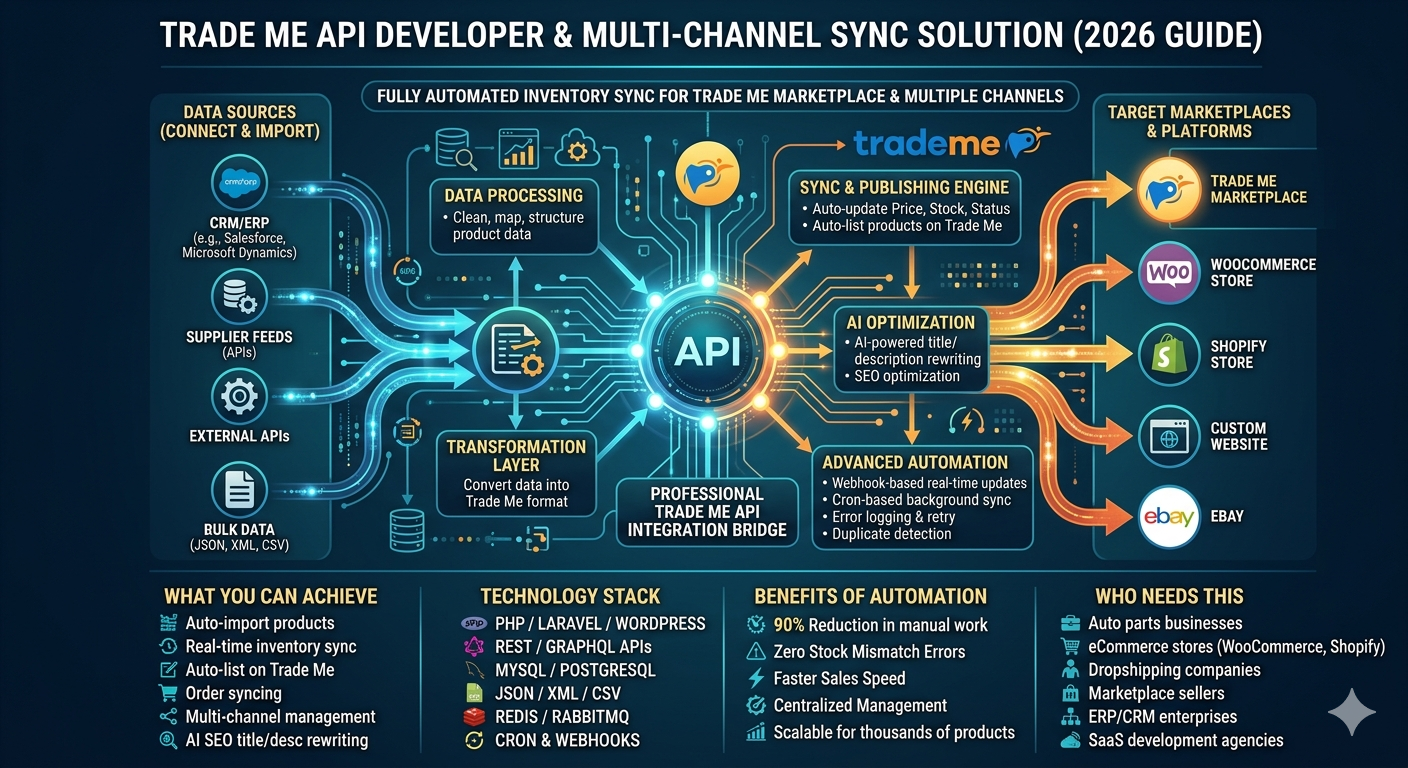
Running a high-volume WooCommerce store requires more than just a standard “import” tool. To stay competitive, your store needs to be a real-time reflection of your global operations—integrating seamlessly with ERPs, Warehouse Management Systems (WMS), external supplier feeds, and POS systems. Relying on manual updates or basic plugins leads to overselling, pricing errors, and performance bottlenecks.
My WooCommerce Sync Engine is a custom-built, server-side solution designed to manage complex product data, real-time inventory, and multi-channel synchronization without ever slowing down your customer’s shopping experience.
The Challenge: WooCommerce Scaling & Data Integrity
As a WooCommerce store grows, the default WordPress database structure (EAV model) can become a bottleneck. Standard importers often struggle with:
- Variable Product Bloat: Syncing products with dozens of attributes (size, color, material) often causes timeouts in standard plugins.
- Real-Time Stock Deadlocks: Updating stock levels for thousands of SKUs simultaneously can lock database tables, causing checkout failures for customers.
- Image Processing Lag: Re-generating thumbnails for every sync cycle wastes CPU resources and fills up server storage with duplicates.
- Webhook Overload: Handling thousands of “Order Created” or “Stock Updated” pings from external APIs can crash a standard WordPress setup.
Custom WooCommerce Sync Features
I architect integrations that prioritize speed, security, and scalability. My approach treats WooCommerce as a high-performance commerce engine rather than just a blogging tool.
1. High-Frequency Inventory Syncing
For stores selling across multiple platforms (Amazon, eBay, Physical Retail), inventory must be accurate to the second. I implement Incremental Stock Updates:
- Delta-Only Updates: We only sync the “Stock Quantity” field, ignoring all other data unless a change is detected.
- Lock-Free Updates: Utilizing direct SQL queries to update stock levels, bypassing the heavy
WC_Product object overhead for 10x faster execution.
2. Complex Variation & Attribute Mapping
Handling thousands of variable products requires specialized logic. My engine can:
- Auto-Link Variations: Connect parent products to their variations across multiple CSV or JSON feeds using SKUs as a primary key.
- Dynamic Pricing Engines: Automatically adjust prices based on supplier cost, exchange rates, or specific “Sale” windows defined in your external CRM.
- Bulk Attribute Normalization: Ensure that “XL”, “Extra Large”, and “Size: XL” are all mapped to a single unified global attribute in WooCommerce.
3. Two-Way Order & Customer Sync
True integration means data flows both ways. I build Automated Order Pipelines:
- Real-Time Order Export: As soon as a customer pays, the order data is pushed to your ERP or Fulfillment center via secure REST API or SFTP.
- Shipment Tracking Automation: When your warehouse marks an item as “Shipped” in their system, my engine fetches the tracking number and updates the WooCommerce order status, triggering the “Shipment Sent” email to the customer.
Performance Architecture: CLI & Server-Side Cron
To ensure your front-end remains lightning-fast for shoppers, all synchronization tasks are moved to the Background Processing Layer:
- WP-CLI Integration: We run sync tasks via the Command Line, which has higher memory limits and no time-out restrictions compared to the web browser.
- Linux System Cron: We schedule updates (e.g., Inventory every 5 minutes, Full Catalog every 24 hours) at the OS level, ensuring 100% reliability regardless of site traffic.
- Batch Processing: We break 100,000 products into “chunks” of 500, clearing the cache between each batch to prevent server memory spikes.
Comparison: Custom Sync Engine vs. Generic Plugins
| Feature |
Standard WC Importers |
My Custom Sync Engine |
| Sync Frequency |
Limited by Traffic |
Every 1-5 Minutes (Guaranteed) |
| Inventory Logic |
Full Overwrite |
Incremental “Delta” Updates |
| Variation Handling |
Slow / Prone to Errors |
Optimized Multi-File Mapping |
| Data Security |
Basic API Key storage |
SSH Keys & Encrypted Environment Vars |
Frequently Asked Questions
Q: Can you sync WooCommerce with a legacy ERP that only exports CSV via FTP?
Yes. I specialize in building “Watchdog” scripts that monitor your FTP folder. As soon as a new CSV is detected, the engine parses it and updates your store immediately.
Q: How do you handle “Out of Stock” items that are no longer in the feed?
The engine performs a “Sync Reconciliation.” Any items currently in WooCommerce but missing from the master feed can be automatically set to “Out of Stock,” hidden, or moved to a draft status based on your business rules.
Q: Will this work with High-Performance Order Storage (HPOS)?
Absolutely. My integrations are built to support the latest WooCommerce standards, including HPOS, ensuring your site is future-proof and optimized for speed.
Ready to Scale Your WooCommerce Store?
Stop fighting with plugins that timeout and inventory errors that cost you sales. Get a high-performance synchronization engine built for the specific demands of your business.
📩 Discuss your WooCommerce Integration on Upwork
High-Performance WordPress Sync for Large CSV & Excel Datasets
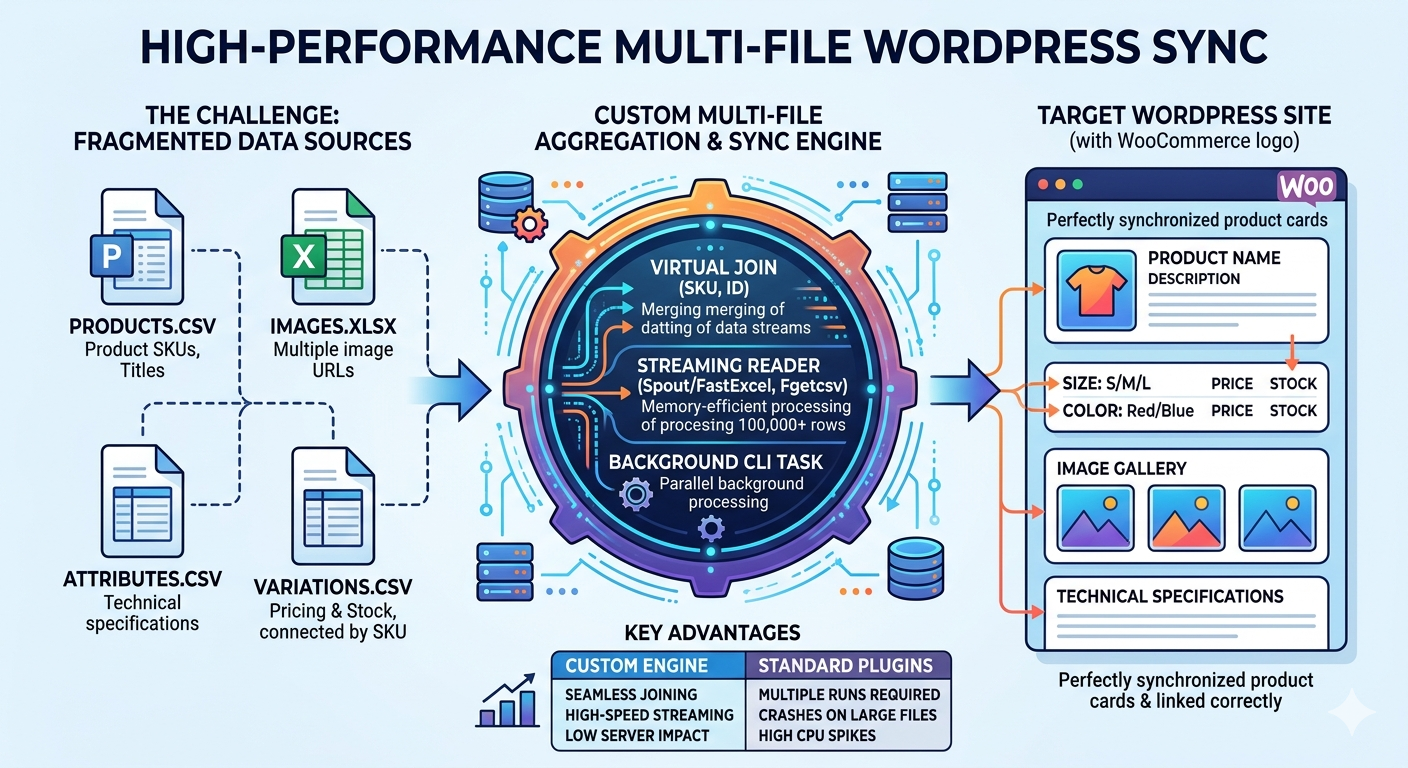
Managing large-scale data in WordPress becomes exponentially more difficult when your information is scattered across multiple CSV or Excel files. Standard plugins often choke when they have to cross-reference a “Products.csv” with an “Images.xlsx” and a separate “Attributes.csv”.
My custom Multi-File Data Aggregation Engine is designed to handle massive datasets (100,000+ rows) by merging, organizing, and normalizing data from multiple remote or local sources before importing it into WordPress with surgical precision.
The Challenge: Complex Data Relationships
Most “off-the-shelf” importers assume your data is perfectly organized in a single file. In reality, enterprise data is often fragmented:
- File A (Core Data): Product SKUs, Titles, and Descriptions.
- File B (Variations): Pricing and Stock for different sizes/colors linked by SKU.
- File C (Gallery): Multiple image URLs for each product.
- File D (Attributes): Technical specifications and custom metadata.
Standard plugins attempt to process these one by one, often leading to database bloat, broken relationships, and partial imports due to server timeouts.
My Architecture: Multi-File Aggregation & Sync
I build custom ETL (Extract, Transform, Load) pipelines that treat your multiple files as a relational database. This ensures your data is 100% accurate before it ever touches your WordPress site.
1. Virtual Data Merging (The “Join” Layer)
Instead of running four separate imports, my engine reads all files into a temporary server-side buffer. It performs a “Virtual Join” based on a unique identifier (like SKU or ID). This ensures that when a product is created, its variations, images, and attributes are attached simultaneously in a single atomic action.
2. Memory-Efficient Excel & CSV Streaming
Standard PHP libraries for Excel (like PhpSpreadsheet) are notorious for crashing on large files. I utilize Spout/FastExcel and Fgetcsv streaming. This allows the system to read a 500MB Excel file row-by-row, consuming only a few megabytes of RAM.
3. Intelligent Variation & Attribute Mapping
Handling WooCommerce variations is complex. My engine automatically detects parent-child relationships across multiple files. It handles:
- Automatic creation of global or local attributes.
- Mapping multiple images from a secondary file to the correct variation gallery.
- Dynamic pricing calculations (e.g., adding a 10% markup from a separate “Suppliers” file).
Advanced Performance Features
- Server-Side Background Processing: We bypass the web browser entirely. The sync runs as a background task via CLI (Command Line Interface), meaning you can close your computer and the sync will continue until finished.
- Asset Hash Checking: To prevent duplicating thousands of images, we check the hash of existing media. If the image in “File C” is already in your library, we link it instead of re-downloading it.
- Data Normalization: We automatically fix common Excel errors like “broken characters,” “improper date formats,” and “missing required fields” during the merge process.
Comparison: Custom Multi-File Engine vs. Standard Plugins
| Feature |
Standard Plugins |
Custom Multi-File Engine |
| Multi-File Joining |
Requires multiple runs |
Seamless Virtual Joins |
| Large Excel Support |
Crashes on large files |
High-Speed Streaming |
| Variation Logic |
Manual mapping per file |
Automated Relation Detection |
| Server Impact |
High (Spikes during import) |
Low (Optimized Background Cron) |
Frequently Asked Questions
Q: Can you pull files from different locations (e.g., one from FTP and one from a URL)?
Yes. My engine can fetch “File A” from a remote URL and “File B” from a secure SFTP server, merge them in the server’s cache, and process them as one unified dataset.
Q: How do you handle image galleries stored in a separate file?
The engine looks for the common ID in your image file, collects all associated URLs, and sideloads them into the WordPress Media Library, attaching them to the correct post or product in the correct order.
Q: Is there a limit to the number of rows?
Because we use CLI-based streaming, there is no hard limit. I have successfully managed syncs involving over 250,000 products with multiple variations per product.
Stop Struggling with Fragmented Data
Don’t waste days trying to clean up Excel files or running multiple imports. Let’s build an automated system that organizes your data and syncs it perfectly every time.
📩 Discuss Your Complex Data Sync on Upwork
Custom JSON API Integration & Automated Import for WordPress
In the modern web, JSON is the gold standard for data exchange. Whether you are connecting to a REST API, a third-party CRM, or a headless data source, a standard “file importer” isn’t enough. You need a real-time JSON sync engine that respects data hierarchies and server performance.
My custom WordPress JSON Integration service replaces unreliable plugins with a robust, server-side architecture that handles nested JSON arrays, authentication (OAuth2, API Keys), and high-frequency updates without slowing down your site.
The Challenge with Standard JSON Importers
Most generic WordPress JSON plugins struggle with “Nested Data”—where information is buried deep inside multiple levels of the JSON structure. They also rely on manual uploads, which means your data is outdated the moment you click ‘Import’.
- Authentication Hurdles: Many APIs require complex headers or token refreshes that basic plugins can’t handle.
- Nested Arrays: Standard tools fail to map data like
products > variants > colors > stock.
- Resource Exhaustion: Fetching a 50MB JSON payload via PHP often hits memory limits.
- Static Imports: No way to “Listen” for changes; you have to re-run the whole file.
High-Performance JSON Sync Features
I build custom JSON handlers that function as a bridge between your data source and your WordPress database.
- Direct REST API Connectivity: Fetch data directly from a URL with full support for GET/POST requests and Bearer Tokens.
- Deep Data Mapping: I write custom parsers to extract data from any nested level and map them to WordPress Post Meta, Taxonomies, or WooCommerce Attributes.
- Server-Side Background Processing: Using Linux system crons, the JSON is parsed in chunks in the background, keeping your admin dashboard fast.
- Webhook Integration: Enable “Push” updates—whenever the source JSON changes, your WordPress site updates instantly.
Optimized “Change-Only” Processing
Processing a large JSON feed every 5 minutes is heavy. My custom engines use JSON Pointer and Field Hashing to optimize performance:
- Checksum Verification: We compare the remote JSON object’s checksum with the local version. If nothing changed, we stop the process in milliseconds.
- Memory-Efficient Parsing: We use stream-parsing (parsing the JSON line-by-line) rather than loading the whole file into RAM.
- Image URL Persistence: We check if the image URL has changed before attempting a new sideload, preventing thousands of duplicate media entries.
Supported Use Cases
- Headless CMS Sync: Syncing content from Contentful, Strapi, or Ghost into WordPress.
- Inventory Management: Real-time stock updates from ERPs like SAP, NetSuite, or Odoo via JSON API.
- External Data Feeds: Sports scores, stock market data, or weather feeds mapped to custom post types.
- WooCommerce Product Sync: Automating pricing and availability from external supplier APIs.
Comparison: Plugin vs. Custom JSON Engine
| Capability |
Standard JSON Plugins |
Custom API Engine |
| Nested Objects |
Limited / Flat only |
Unlimited Depth |
| Auth Support |
Basic only |
OAuth2 / JWT / Custom Headers |
| Data Volume |
Small files only |
Enterprise (Millions of nodes) |
| Execution |
Manual / WP-Cron |
System Cron / Webhooks |
Frequently Asked Questions
Q: Can you sync data from a password-protected JSON API?
Yes. I specialize in setting up secure handshakes using API Keys, OAuth2, or IP Whitelisting to ensure your data transfer is safe.
Q: My JSON structure is very complex. Can you map it to Houzez or MyListing?
Absolutely. I write custom mapping logic that “flattens” the JSON into the specific meta-keys required by your theme.
Q: What happens if the API is down?
The system includes error-logging and retry-logic. If the API fails, your site keeps the existing data and tries again on the next scheduled cron cycle.
Need a Professional JSON Integration?
Stop struggling with “out of the box” importers that don’t fit your data structure. Let’s build a high-performance bridge for your JSON data.
📩 Contact me on Upwork to discuss your JSON API project.
High-Performance XML & API Data Synchronization for WordPress
While basic plugins like WP Smart Import offer simple data migration, professional platforms require more than just an “import.” They require a reliable synchronization engine that ensures data integrity without crashing the server.
My custom WordPress XML/API Sync Solution is designed for high-volume websites, utilizing server-side architecture to handle complex data mapping, real-time updates, and resource-heavy synchronization tasks that standard plugins fail to manage.
The Problem with Standard WordPress Importers
Most popular importers rely on wp-cron.php. This means if your site has low traffic, the sync never triggers. If you have high traffic, the sync can trigger multiple times, causing server spikes and “Database Connection Error” screens.
- WP-Cron Dependency: Unreliable execution on low-traffic sites.
- Full Overwrites: Standard plugins often re-download every image and post, wasting bandwidth.
- Timeouts: Large XML files (10MB+) often crash during the process.
- Manual Mapping: Limited flexibility for custom database tables or specialized themes.
Enterprise-Grade Sync Features
I build custom sync engines that bypass the limitations of the WordPress loop. My approach focuses on Performance First.
- Server-Level Cron Jobs: Synchronization is handled by the server (Linux/Ubuntu) directly, ensuring it runs every minute, 24/7, regardless of site traffic.
- Smart Delta Syncing: The system detects only changed fields (e.g., a price drop or title change) and updates only those specific cells in the database.
- Background Image Processing: Images are queued and optimized in the background so the front-end stays lightning-fast.
- Multi-Source Integration: Sync data from XML, CSV, JSON, or external REST APIs simultaneously.
How the “Delta Sync” Works
Instead of a “Delete and Re-import” strategy, my custom logic uses a high-performance comparison layer:
- Hash Comparison: Each record is assigned a unique hash. If the source hash hasn’t changed, the record is skipped entirely, saving 99% of server resources.
- Selective Updating: If only the “Image URL” changes, the system updates the meta-field without touching the post content or title.
- Automatic Cleanup: When a record disappears from your XML feed, it is automatically archived or deleted from WordPress.
Supported Data & Themes
This synchronization engine is theme-agnostic but optimized for complex structures:
- Themes: Houzez, RealHomes, ListingPro, MyListing, WoodMart, and WooCommerce.
- Custom Post Types: Full support for ACF (Advanced Custom Fields), JetEngine, and Toolset.
- E-commerce: Real-time stock and price syncing for WooCommerce from external ERPs.
Why Choose a Custom Sync Engine Over a Plugin?
- No Yearly Subscription: One-time setup of your custom engine versus recurring plugin fees.
- Zero Bloat: No unnecessary UI elements slowing down your WordPress admin.
- Scalability: Built to handle 100,000+ records without breaking a sweat.
- Security: Direct API-to-Server communication with no “middleman” scripts.
Frequently Asked Questions
Q: Will this sync slow down my website?
No. Because we use server-side crons and delta-syncing, the process runs in the background with a low priority, ensuring your visitors never feel a performance dip.
Q: Can you handle XML files with over 50,000 items?
Yes. We use batch-processing logic to break large files into smaller, manageable chunks that your server can process easily.
Q: Does this work on shared hosting?
It works best on VPS or Dedicated servers where we have access to System Crons, but I can also optimize it for high-end shared hosting environments.
Ready for a Reliable Data Sync?
Stop fighting with plugins that timeout and fail. Get a custom-built synchronization engine tailored to your server’s hardware and your data’s structure.
📩 Contact me on Upwork to discuss your XML/API synchronization architecture.
Car Parts API Integration Service (Two-Way Sync for WooCommerce)
Connect your automotive supplier API with WooCommerce using a fully automated
two-way synchronization system. Import products, update stock and pricing,
and automatically send WooCommerce orders back to the supplier API in real time.
Core Features
- Automatic product import from supplier API
- Stock and pricing synchronization
- Vehicle compatibility and fitment mapping
- Two-way sync: WooCommerce orders posted back to supplier API
- Order status and tracking updates back to WooCommerce
- Custom plugin or middleware development
How Two-Way Sync Works
- Supplier API sends product data → Imported into WooCommerce
- Inventory and prices update automatically on schedule or webhook
- Customer places order on WooCommerce
- Order data is instantly posted to supplier API
- Supplier returns status, tracking, or confirmation
- WooCommerce order updates automatically
Integration Capabilities
Products
- SKU, brand, MPN, descriptions, images
- Categories and attributes mapping
- Bulk import and incremental updates
Inventory
- Real-time stock updates
- Multi-warehouse support
- Pricing rules and margins
Orders (Two-Way)
- Send new WooCommerce orders to supplier API
- Receive order confirmations
- Tracking number sync
- Status updates automation
Supported Platforms
- WordPress and WooCommerce
- Custom PHP or Node middleware
- REST, JSON, XML, SOAP APIs
- ERP and CRM integrations
Use Cases
- Automotive dropshipping automation
- Large supplier catalog sync (10k+ products)
- Marketplace aggregator build
- Vehicle lookup and fitment system
Business Benefits
- Zero manual product uploads
- Automated supplier ordering
- Reduced stock errors
- Faster fulfillment
- Scalable automotive infrastructure
Mobilux Latvia API & XML Integration – Real-Time Catalog Sync for WooCommerce
For GSM and electronics resellers in the Baltic market, sourcing from Mobilux.lv is a strategic advantage. However, managing thousands of SKUs, varying stock levels, and daily price changes manually is a recipe for errors and lost sales. In 2026, automation is the key to scaling your e-shop.
Our Mobilux.lv integration service connects your WooCommerce store directly to the Mobilux distributor system using their professional XML/API functions. This ensures your website stays updated with the latest Apple, Samsung, and Xiaomi products in real-time—without you ever needing to upload a spreadsheet.
What Is Mobilux.lv?
Mobilux Latvia (SIA MLUX) is a premier wholesale distributor of mobile phones, computer hardware, and household appliances in Latvia. With a client base of over 400 companies, they offer a sophisticated B2B online system featuring XML and API capabilities specifically designed for e-commerce integration.
Why Automate Your Mobilux Latvia Feed?
- Live Availability: Mobilux’s stock is highly dynamic. API sync prevents “out-of-stock” orders by updating inventory every few minutes.
- Localized Content: Automatically fetch product titles, EAN codes, and specifications optimized for the Latvian and Baltic markets.
- Price Protection: Wholesale prices fluctuate. Our integration monitors these changes and adjusts your retail price instantly to preserve your margins.
- Full Category Coverage: From high-end smartphones to small domestic appliances (SDA), automate the entire catalog with one setup.
What We Build with Mobilux.lv Integration
We provide a robust technical solution using Mobilux’s dedicated developer features:
- ✔ XML/API Sync Engine: A custom-built script that polls the Mobilux servers for the latest product data.
- ✔ Smart Product Importer: Auto-creates products in WooCommerce with full attributes (Brand, Model, Warranty info).
- ✔ Category Mapping: Map Mobilux categories (e.g., “Tablets,” “E-scooters”) directly to your store’s structure.
- ✔ Automated Image Handling: Sync high-quality product galleries from the distributor directly to your media library.
- ✔ Custom Markup Logic: Apply different profit margins to different brands or price ranges automatically.
How the Integration Works (Technical Workflow)
- API/XML Access: We configure the connection using your Mobilux.lv reseller credentials.
- Data Parsing: Our system interprets the XML/API response, handling thousands of items efficiently.
- WooCommerce Update: New products are added, and existing products are updated for stock and price.
- Cron Job Automation: We set up background tasks on your server to run the sync at your preferred frequency (e.g., every 30 minutes).
- Order Sync (Optional): We can implement order transmission to help you move toward a full dropshipping model.
Supported Brands & Categories
Our integration handles the extensive Mobilux portfolio, including:
Apple, Samsung, Xiaomi, Sony, Canon, Bosch, Philips, Microsoft, Nintendo, and many more across GSM, Photo, and TV categories.
Core Features of Our Service
- ⮕ Real-Time Stock Accuracy: Never miss a sale or sell what isn’t there.
- ⮕ B2B Price Integration: Fetch your specific wholesale prices directly.
- ⮕ Clean Architecture: Lightweight code that won’t slow down your website.
- ⮕ Bulk Attribute Sync: Import EANs, Manufacturer codes, and detailed specs automatically.
- ⮕ Error Reporting: A dashboard view to monitor the health of your API/XML connection.
Why Partner With Me?
I am a senior full-stack developer with over 10 years of experience in API orchestration. I have delivered 1000+ successful integrations, specializing in connecting regional European distributors like Mobilux to WooCommerce. I build systems that are secure, scalable, and designed to save you hours of manual work every week.
Frequently Asked Questions (FAQ)
Q: Do I need a special account to use the Mobilux XML/API?
Yes. You must be a registered Mobilux.lv client. During registration, you should request access to their XML/API functions.
Q: Can it handle multiple languages?
Yes. We can configure the sync to pull product data in the languages Mobilux provides (LV, RU, EN).
Q: How fast is the import process?
We use batch processing to ensure that even a catalog of 5,000+ items is imported smoothly without taxing your server resources.
Q: Can I set different prices for different groups?
Absolutely. We can build logic into the sync to apply specific markups for certain brands (e.g., 5% on Apple, 15% on accessories).
Get Your Custom Mobilux.lv API Integration Quote
Ready to automate your product feed and dominate the Baltic electronics market?
📩 Contact me on Upwork today to discuss your project. Let’s build a high-conversion, automated store for your business.
TelForceOne API Integration – Automate GSM & Electronics Product Imports for WooCommerce
If you are a reseller of GSM accessories, consumer electronics, or small appliances and need to import products from TelForceOne into WooCommerce, manual catalog management is a bottleneck. In 2026, staying competitive requires real-time data and automated fulfillment.
Our TelForceOne API integration service provides a fully automated bridge between TelForceOne’s wholesale catalog and your WordPress/WooCommerce store. Fetch thousands of products, sync live stock levels, and automate your dropshipping workflow without touching a single CSV file.
What Is TelForceOne?
TelForceOne is one of the largest distributors of mobile accessories and electronics in Europe. With brands like Forever, Setty, MaxLife, and GFC, they offer a massive inventory of thousands of SKUs. For resellers, their API is the key to unlocking “Hands-Free” e-commerce by automating the supply chain from import to delivery.
Why API-Based Integration is Essential for GSM Resellers
- Eliminate “Ghost Stock”: GSM accessories move fast. The API ensures you never sell an item that just went out of stock in the central warehouse.
- Dynamic Pricing Control: Automatically adjust your retail prices based on wholesale cost fluctuations and currency changes.
- Rich Product Data: Import high-resolution images, technical specifications, and EAN codes directly into your product pages.
- Automated Dropshipping: Push customer orders directly to TelForceOne’s system for immediate fulfillment.
What We Build with TelForceOne API
Using TelForceOne’s RESTful endpoints, we develop a custom sync engine for your WooCommerce store:
- ✔ Bulk Product Importer: Auto-create products with categories, descriptions, and attributes.
- ✔ Real-Time Inventory Sync: Update stock levels across thousands of SKUs every few minutes.
- ✔ Automated Image Mapping: High-quality product galleries assigned to the correct variations.
- ✔ Order Export Automation: Send WooCommerce orders directly to the TelForceOne panel via API.
- ✔ Multi-Language Support: Fetch product data in different languages to serve international markets.
How the Integration Works (Technical Workflow)
- API Connection: Secure authentication using your TelForceOne partner credentials.
- Data Fetching: Our script calls the
/products and /stocks endpoints to retrieve the latest feed.
- WooCommerce Mapping: Smart mapping of TelForceOne attributes to WooCommerce “Product Variations” (Colors, Models, Compatibility).
- Scheduled Cron Jobs: Automated updates for pricing and availability run in the background (hourly or daily).
- Order Synchronization: Successful store orders are automatically transmitted to TelForceOne for processing.
Supported Brands & Categories
We specialize in integrating the full spectrum of TelForceOne’s portfolio, including:
Forever, Setty, MaxLife, GFC Energy, Forever Light, GSM Accessories, Consumer Electronics, and Home Appliances.
Core Features of Our Service
- ⮕ Real-Time Stock Sync: Prevent overselling with 100% inventory accuracy.
- ⮕ Automated Price Markups: Set rules (e.g., Cost + 20%) to ensure your margins are always protected.
- ⮕ Variation Handling: Seamlessly manage different cable lengths, battery capacities, and colors.
- ⮕ Direct Tracking Sync: Import shipping tracking numbers from TelForceOne back into WooCommerce.
- ⮕ Scalable Performance: Optimized to handle catalogs with 10,000+ products without slowing down your site.
Why Partner With Me?
I am a senior full-stack developer with 10+ years of experience in wholesale API orchestration. Having delivered 1000+ successful integrations, I understand the technical requirements of high-volume electronics stores. I build systems that are robust, error-handled, and designed for long-term growth.
Frequently Asked Questions (FAQ)
Q: Does this work with any WooCommerce theme?
Yes. Our solution works independently of your design, compatible with Astra, Flatsome, WoodMart, and custom builds.
Q: Can I filter which products to import?
Absolutely. You can choose to import specific brands, categories, or only items that are currently in stock.
Q: How often does the stock update?
We can configure the sync to run as often as every 15 minutes to ensure maximum accuracy.
Q: Is the order automation secure?
Yes. All order data is transmitted via encrypted API calls directly to the distributor.
Get Your Custom TelForceOne API Integration Quote
Ready to automate your electronics store and scale your GSM business without the manual headache?
📩 Contact me on Upwork today to discuss your project. Let’s build a high-performance automated store.
Fio Bank API Integration – Real-Time Payments, Transactions & Accounting in WordPress/WooCommerce
If you operate an online store or service in the Czech Republic and rely on Fio Bank for your business accounts, manual payment tracking and bank reconciliation can slow your workflow. In 2026, clients expect seamless, automated financial operations without leaving your website.
Our Fio Bank API integration service connects your WordPress or WooCommerce platform directly with Fio Bank using their REST/SOAP APIs—enabling real-time transaction fetching, payment reconciliation, and automated accounting without logging into external banking systems.
What Is Fio Bank API?
Fio Bank provides robust banking APIs for Czech businesses. With their API, you can fetch transaction history, initiate payments, check balances, and integrate banking data into custom applications. By integrating Fio Bank’s API into WordPress or WooCommerce, your site becomes a central hub for financial operations.
Why API-Based Bank Integration is Essential
- Eliminate Manual Reconciliation: Automatically update orders and payments in real time.
- Zero Errors: Reduce mistakes caused by manual entry or delayed bank notifications.
- Full Financial Transparency: Track every payment, invoice, and refund directly from your site.
- Customer Trust: Provide a smooth, on-site checkout experience with instant payment confirmation.
What We Build with Fio Bank API
Using Fio Bank’s API, we develop a seamless financial integration for WordPress/WooCommerce stores:
- ✔ Automatic Payment Confirmation: Orders are marked as paid as soon as funds arrive.
- ✔ Transaction Sync: Fetch incoming and outgoing transactions directly into WordPress/WooCommerce.
- ✔ Accounting Automation: Connect transactions to invoices, refunds, and bookkeeping entries.
- ✔ Webhook Alerts: Receive notifications for payments, failed transactions, or account changes.
- ✔ Secure API Authentication: Use Fio Bank’s token system to keep data secure.
How the Integration Works (Technical Workflow)
- API Authentication: Secure token-based connection to Fio Bank API.
- Data Mapping: Map WooCommerce orders to Fio Bank transactions for seamless reconciliation.
- Sync Engine: Real-time API calls ensure transaction and payment status updates automatically.
- Webhook Listener: Monitor transaction events and automatically update order/payment statuses.
- Error Logging: Dashboard shows API call statuses and any sync errors.
Supported Platforms & Integrations
We specialize in connecting Fio Bank API with:
WordPress, WooCommerce, custom PHP websites, SaaS platforms, accounting plugins, Stripe, PayPal, and ERP systems.
Core Features of Our Service
- ⮕ Real-Time Transaction Sync: Always accurate order/payment data.
- ⮕ Automated Accounting: Link bank transactions to invoices, refunds, and bookkeeping entries.
- ⮕ Secure Payment Processing: PCI-compliant integration with WooCommerce checkout.
- ⮕ Custom Workflow Rules: Apply business logic for order status updates, refunds, and notifications.
- ⮕ Mobile-Friendly Dashboard: View payments, transactions, and logs on any device.
Why Partner With Me?
I am a senior full-stack developer with 10+ years of experience in API orchestration and financial automation. Having delivered 1000+ successful integrations, I ensure your banking workflows are fast, accurate, and scalable, eliminating manual reconciliation errors.
Frequently Asked Questions (FAQ)
Q: Does this work with any WordPress/WooCommerce theme?
Yes. Our solution is theme-agnostic and works with Elementor, Divi, Bricks, or custom Gutenberg builds.
Q: Can it automatically mark orders as paid?
Absolutely. Payments are synced in real time with WooCommerce orders.
Q: Is my banking data secure?
Yes. We use Fio Bank’s secure API token system and follow best practices for data privacy.
Q: Can this handle multiple accounts?
Yes. We can integrate multiple Fio Bank accounts into one dashboard.
Get Your Custom Fio Bank API Integration Quote
Ready to automate payments, accounting, and banking workflows directly in your WordPress/WooCommerce store?
📩 Contact me on Upwork today to discuss your project. Let’s build a system that saves time and reduces errors.
Fakturoid API Integration – Real-Time Invoicing, Billing & Automation Without Leaving Your Website
If you run a small business, freelance service, or SaaS platform and rely on an invoicing system like Fakturoid.cz, manually entering invoices or switching between tools often leads to errors and wasted time. In 2026, clients expect seamless, efficient backend workflows that save you time and money.
Our Fakturoid API integration service connects your WordPress website, CRM, or SaaS platform directly with Fakturoid using modern REST APIs—enabling automatic invoice creation, payment tracking, and financial workflow automation without sending users away from your domain.
What Is Fakturoid?
Fakturoid.cz is a cloud-based invoicing and billing solution designed for freelancers, small businesses, and self-employed professionals. It allows you to create, send, and manage invoices online, track payments, and automate reminders. By integrating Fakturoid’s API into your systems, you remove manual data entry and ensure real-time financial synchronization.
Why API-Based Invoicing Integration is the Gold Standard
- Eliminate Manual Data Entry: Automatic invoice creation, updates, and payment reconciliation.
- Zero Errors: Eliminate mistakes caused by copying and pasting figures between systems.
- Full Financial Transparency: Track your cash flow, paid/unpaid invoices, and accounting data from a unified dashboard.
- User Experience: Keep users and administrators inside your platform without constant redirects to external systems.
What We Build with Fakturoid API
Using the official Fakturoid REST API, we create a seamless financial workflow integration that:
- ✔ Automated Invoice Generation: Create invoices automatically based on user actions or transactions.
- ✔ Real-Time Payment Sync: Update payment status instantly when funds are received.
- ✔ Customer & Contact Sync: Create and update client records automatically.
- ✔ Webhook Notifications: Trigger webhooks for invoice events like reminders, overdue notices, or status changes.
- ✔ Secure API Tokens: Authenticate securely with best practice token handling.
How the Integration Works (Technical Workflow)
- API Authentication: Secure OAuth or token-based connection to Fakturoid API.
- Data Mapping: We map your system’s invoice and client fields to Fakturoid’s structure.
- Sync Engine: Real-time sync via REST API calls and optional cron scheduling.
- Webhook Listener: Receive instant notifications for invoice updates.
- Error Handling & Logs: Admin dashboard showing sync statuses and logs for debugging.
Supported Platforms & Integrations
We specialize in connecting Fakturoid with WordPress, WooCommerce, CRMs, and SaaS platforms:
WordPress, WooCommerce, Salesforce, Zoho CRM, HubSpot, Pipedrive, QuickBooks, Stripe, PayPal, and custom API systems.
Core Features of Our Service
- ⮕ Automated Invoicing: Generate invoices in real time based on business events.
- ⮕ Secure Payment Sync: PCI-compliant integration with Stripe or PayPal.
- ⮕ Custom Workflow Logic: Tailored business rules for recurring invoices, credits, or discounts.
- ⮕ Multi-Currency Support: Automatically detect and apply currencies where applicable.
- ⮕ Dashboard & Reporting: View invoice statuses and sync logs from one panel.
Why Partner With Me?
I am a senior full-stack developer with 10+ years of experience in API integrations, automation workflows, and custom SaaS solutions. Having delivered 1000+ successful sync integrations, I ensure your financial system is fast, accurate, and scalable.
Frequently Asked Questions (FAQ)
Q: Does this work with any WordPress theme?
Yes. Our solution is theme-agnostic and works with Elementor, Divi, Bricks, or custom Gutenberg builds.
Q: Can Fakturoid generate invoices automatically?
Absolutely. Based on transactions in your CRM, WooCommerce store, or custom platform.
Q: Is data secure?
Yes. We use secure API token handling and follow best practices for authentication and data privacy.
Q: Do you provide ongoing support?
Yes, monitoring and maintenance contracts are available.
Get Your Custom Fakturoid API Integration Quote
Ready to automate your invoicing and financial workflows with seamless API integration?
📩 Contact me on Upwork today to discuss your project. Let’s build a system that saves time and reduces errors.
Service
Updated: 2025-09-16
Scrape Products from Any Website and Insert into WooCommerce Automatically
Running a WooCommerce store means constantly updating your product catalog. If your suppliers, marketplaces, or competitors don’t provide structured feeds, a WooCommerce product web scraper can extract product details from sites like Amazon, AliExpress, eBay, Walmart, or Shopify stores and insert them directly into your WordPress shop—fully automated.
What this WooCommerce web scraper does
- Scrapes product titles, SKUs, and categories
- Extracts descriptions, technical details, and attributes
- Downloads and attaches product images & galleries
- Imports prices, discounts, and stock status
- Handles simple & variable products with attributes like size, color, material
- Schedules automatic updates (hourly/daily)
Works with any source website
This scraper can be configured for:
- Amazon to WooCommerce: Import bestsellers, ASIN-based products, and category feeds.
- AliExpress to WooCommerce: Perfect for dropshipping — scrape prices, reviews, and shipping info.
- eBay to WooCommerce: Auto-import active listings with images and seller details.
- Shopify to WooCommerce: Copy competitor stores and migrate catalogs.
- Custom suppliers: Wholesale/distributor sites with no feed or API.
Workflow: From scraping to WooCommerce insertion
Scrape → Parse → Normalize fields → Generate JSON/CSV/XML → Import via WooCommerce API → Publish
Products are mapped to WooCommerce’s structure, ensuring compatibility with your theme and plugins.
AI-enhanced product imports
- Rewriting: Supplier descriptions can be rewritten into SEO-optimized copy.
- Translation: Add multilingual support with automatic translation.
- Keyword optimization: Boost visibility with AI-driven title/description edits.
- Duplicate prevention: Smart detection ensures no product is listed twice.
Technical challenges solved
- Anti-bot defenses: Bypassed with rotating proxies and smart scraping logic.
- Data consistency: Products normalized into WooCommerce-compatible formats.
- Stock/price syncing: Automated scheduled jobs keep your store updated.
- Scalability: Works for hundreds or thousands of products across marketplaces.
Frequently asked questions
Q: Can products be inserted directly into WooCommerce?
Yes — scraped data is structured into JSON/CSV/XML and pushed via WooCommerce REST API or plugins like WP All Import.
Q: Will it work with variable products (size, color, options)?
Absolutely. Attributes such as size, color, material, or custom options are captured and mapped to WooCommerce variations.
Q: Can it scrape Amazon, AliExpress, or eBay?
Yes. The scraper can be customized for Amazon, AliExpress, eBay, Walmart, Shopify stores, or niche supplier sites.
Get started with WooCommerce Product Scraping → Automated Store Import
If you run a WooCommerce store and want to scrape products from Amazon, AliExpress, eBay, or custom suppliers and insert them directly into your WordPress shop—I can build a custom solution. This includes data scraping, WooCommerce integration, AI-powered rewriting, and scheduled automation.
🌐 Website: apifixer.com
📩 Email: ahmadraza@live.it
📱 WhatsApp: +92 312 6111733
💼 Hire me on Upwork
Author: API Guru · Category: WooCommerce · Tags: woocommerce, amazon scraper, aliexpress importer, ebay to woocommerce, dropshipping, product scraping, ecommerce automation