
WordPress Sync for Large CSV & Excel Datasets
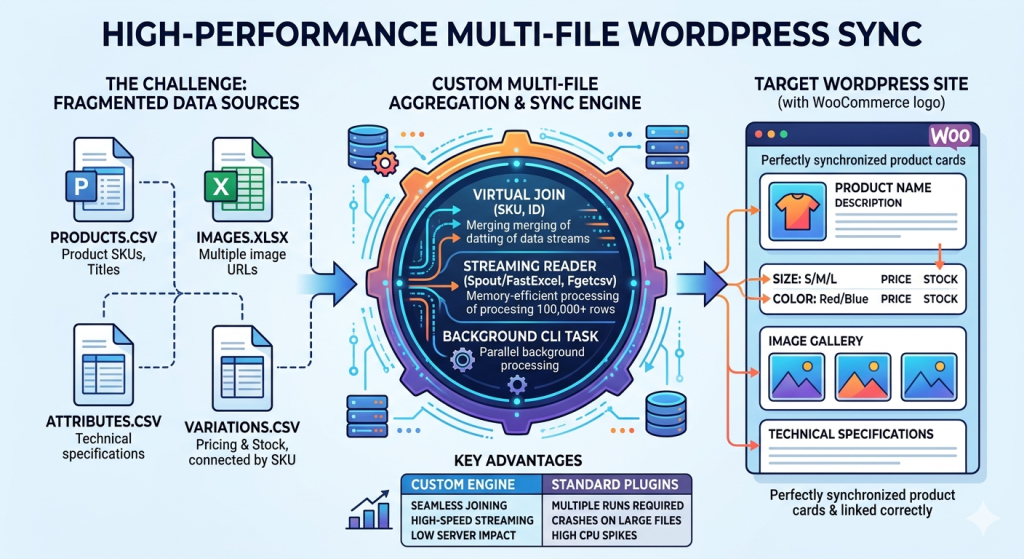
High-Performance WordPress Sync for Large CSV & Excel Datasets
Managing large-scale data in WordPress becomes exponentially more difficult when your information is scattered across multiple CSV or Excel files. Standard plugins often choke when they have to cross-reference a “Products.csv” with an “Images.xlsx” and a separate “Attributes.csv”.
My custom Multi-File Data Aggregation Engine is designed to handle massive datasets (100,000+ rows) by merging, organizing, and normalizing data from multiple remote or local sources before importing it into WordPress with surgical precision.
The Challenge: Complex Data Relationships
Most “off-the-shelf” importers assume your data is perfectly organized in a single file. In reality, enterprise data is often fragmented:
- File A (Core Data): Product SKUs, Titles, and Descriptions.
- File B (Variations): Pricing and Stock for different sizes/colors linked by SKU.
- File C (Gallery): Multiple image URLs for each product.
- File D (Attributes): Technical specifications and custom metadata.
Standard plugins attempt to process these one by one, often leading to database bloat, broken relationships, and partial imports due to server timeouts.
My Architecture: Multi-File Aggregation & Sync
I build custom ETL (Extract, Transform, Load) pipelines that treat your multiple files as a relational database. This ensures your data is 100% accurate before it ever touches your WordPress site.
1. Virtual Data Merging (The “Join” Layer)
Instead of running four separate imports, my engine reads all files into a temporary server-side buffer. It performs a “Virtual Join” based on a unique identifier (like SKU or ID). This ensures that when a product is created, its variations, images, and attributes are attached simultaneously in a single atomic action.
2. Memory-Efficient Excel & CSV Streaming
Standard PHP libraries for Excel (like PhpSpreadsheet) are notorious for crashing on large files. I utilize Spout/FastExcel and Fgetcsv streaming. This allows the system to read a 500MB Excel file row-by-row, consuming only a few megabytes of RAM.
3. Intelligent Variation & Attribute Mapping
Handling WooCommerce variations is complex. My engine automatically detects parent-child relationships across multiple files. It handles:
- Automatic creation of global or local attributes.
- Mapping multiple images from a secondary file to the correct variation gallery.
- Dynamic pricing calculations (e.g., adding a 10% markup from a separate “Suppliers” file).
Advanced Performance Features
- Server-Side Background Processing: We bypass the web browser entirely. The sync runs as a background task via CLI (Command Line Interface), meaning you can close your computer and the sync will continue until finished.
- Asset Hash Checking: To prevent duplicating thousands of images, we check the hash of existing media. If the image in “File C” is already in your library, we link it instead of re-downloading it.
- Data Normalization: We automatically fix common Excel errors like “broken characters,” “improper date formats,” and “missing required fields” during the merge process.
Comparison: Custom Multi-File Engine vs. Standard Plugins
| Feature | Standard Plugins | Custom Multi-File Engine |
|---|---|---|
| Multi-File Joining | Requires multiple runs | Seamless Virtual Joins |
| Large Excel Support | Crashes on large files | High-Speed Streaming |
| Variation Logic | Manual mapping per file | Automated Relation Detection |
| Server Impact | High (Spikes during import) | Low (Optimized Background Cron) |
Frequently Asked Questions
Q: Can you pull files from different locations (e.g., one from FTP and one from a URL)?
Yes. My engine can fetch “File A” from a remote URL and “File B” from a secure SFTP server, merge them in the server’s cache, and process them as one unified dataset.
Q: How do you handle image galleries stored in a separate file?
The engine looks for the common ID in your image file, collects all associated URLs, and sideloads them into the WordPress Media Library, attaching them to the correct post or product in the correct order.
Q: Is there a limit to the number of rows?
Because we use CLI-based streaming, there is no hard limit. I have successfully managed syncs involving over 250,000 products with multiple variations per product.
Stop Struggling with Fragmented Data
Don’t waste days trying to clean up Excel files or running multiple imports. Let’s build an automated system that organizes your data and syncs it perfectly every time.
